
Understanding Schema-Enforced
Outputs
If you've integrated an LLM by parsing its output with regex, you've likely experienced the moment when everything breaks. It's time to make the model speak JSON.
💡 Pin this to keep notes while reading!
📝 Show Notes & Ideas▼
Prerequisites
- Node.js 18+ installed
- An API key from OpenAI, Anthropic, or Azure OpenAI
- Basic TypeScript familiarity
npm install zod openaiThe Regex Trap
If you've integrated an LLM by parsing its output with regex, you've likely experienced the moment when everything breaks. The model updates, changes a single phrase, and suddenly your carefully crafted parser fails, routing urgent customer issues to the wrong department or missing critical data entirely.
This is not a theoretical problem. Consider this real scenario:
Day 1: Your customer support classifier works perfectly. A message like "You charged me twice! I want a refund NOW" produces: "The user is very upset about a duplicate charge. This is a billing issue. Sentiment is negative, and it seems urgent." Your regex const department = output.match(/billing issue/i) ? 'billing' : 'general'; routes it correctly.
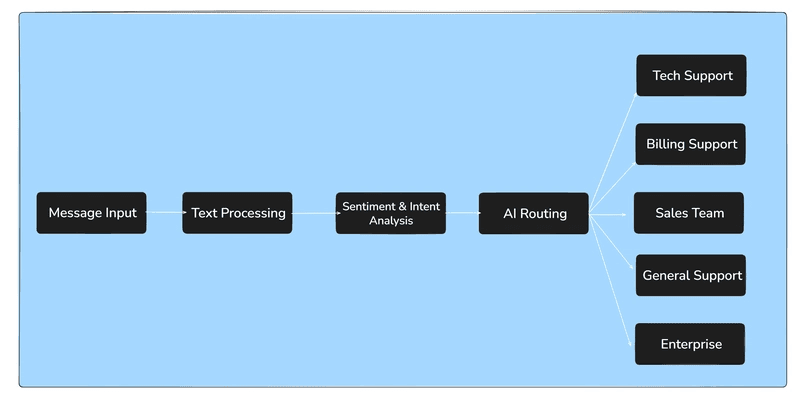
Day 8: The same input now returns: "This is a payment problem. The customer was double-billed and is demanding a refund." Your parser fails. The ticket is misrouted. Your metrics tank.
The root cause is not the model. It is the approach. Unstructured text is designed for humans. Production applications need structured data. The durable solution is to make the model speak JSON and enforce the shape at generation time.
Understanding Schema-Enforced Outputs
Most modern LLM APIs now support structured outputs. You provide a JSON Schema, and the model is constrained to produce output that matches that schema. This is not a prompt trick. It is an API-level contract for production reliability. OpenAI calls this Structured Outputs and distinguishes it from older JSON mode. JSON mode guarantees valid JSON syntax. Structured Outputs enforces your schema, including required properties and enums. OpenAI Platform
Azure’s documentation mirrors this approach and lists the supported subset of JSON Schema. For example, you cannot use an anyOf clause at the very top level of an Azure Policy rule. Design within the published subset for optimal adherence. Microsoft Learn
If you know GraphQL, the mental model is familiar. Define the shape you need up front, then receive exactly that shape. No parsing. No guesswork.
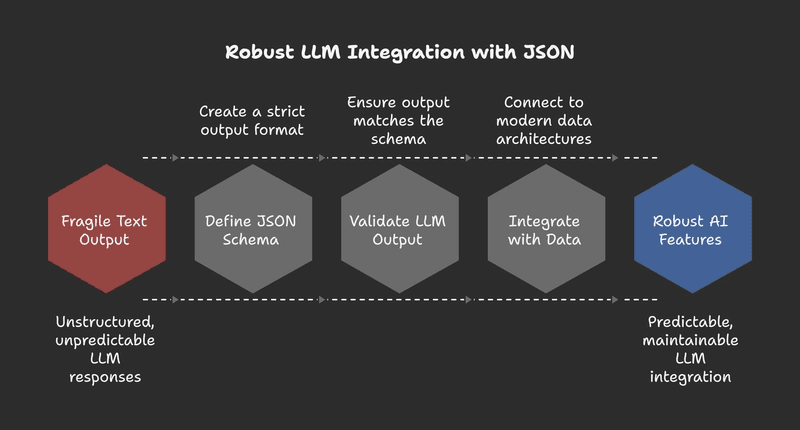
- OpenAI calls this Structured Outputs. It enforces your schema, including required properties and enums.
- Anthropic supports this through tool use with input schemas.
- Azure OpenAI mirrors this approach with supported JSON Schema subsets.
The Four Compounding Benefits
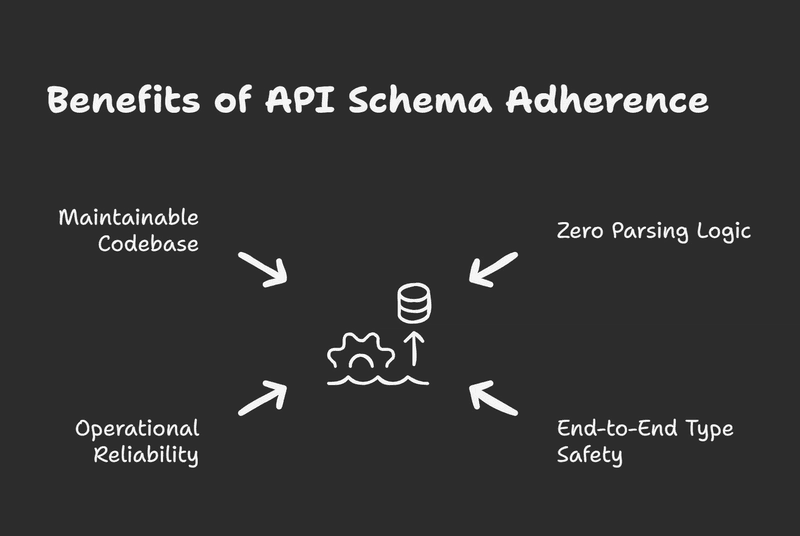
1. Zero Parsing Logic
Stop scraping paragraphs. The API constrains the model to your keys and types.
2. End-to-End Type Safety
Define once with Zod, derive TypeScript types, and validate at runtime. TypeScript ends at compile time; Zod closes the runtime gap.
3. Operational Reliability
Schema adherence reduces retries and format drift. Predictable error handling.
4. Maintainable Codebase
Every response has the same keys. Dashboards stabilize. Alerts are deterministic.
What Structured Outputs Don't Solve
Schema enforcement guarantees shape, not truth. If your schema has a companyName field, the model will return a string in that field, but it might be the wrong company name.
Think of structured outputs as solving the format problem so you can focus on the accuracy problem.
Implementation: A Provider-Agnostic Pattern
The pattern below works with any API that accepts a response schema. We'll use TypeScript and Zod as a single source of truth.
Implementing Structured Outputs
Step 1: Define Your Schema
Use Zod to define schema, types, and guidance in one place. The .describe() annotations steer the model toward the right values.
Reliability and Resilience
For production, add retry logic with exponential backoff. Even with structured outputs, networks fail and models time out.
async function withRetry<T>(
  operation: () => Promise<T>,
  maxAttempts = 3,
  baseDelayMs = 300
): Promise<T> {
  let lastError: unknown;

  for (let attempt = 1; attempt <= maxAttempts; attempt++) {
    try {
      return await operation();
    } catch (error) {
      lastError = error;
      if (attempt < maxAttempts) {
        await new Promise(r => setTimeout(r, baseDelayMs * attempt));
      }
    }
  }

  throw lastError;
}
Integrating With Modern Data Architectures
For teams using GraphQL, treat the LLM as a typed upstream source.
type Mutation {
  enrichLead(rawInquiry: String!): EnrichedLead!
}

type EnrichedLead {
  companyName: String!
  inquiryType: InquiryType!
  urgency: Urgency!
  potentialValue: DealSize!
}
The LLM is no longer a black box. It is a reliable transformer that converts free text into typed graph data.
Considering a Framework for Scale
While using Zod with a provider's native schema is robust, teams managing numerous LLM integrations may benefit from a higher level of abstraction.
Frameworks like BAML (Boundary AI Markup Language) allow you to define, version, and test functions separately from application code. This lets you swap providers (e.g., from OpenAI to Anthropic) with configuration changes and provides a workflow for collaboration between engineers and prompt designers.
Streaming Without Breaking JSON
Streaming feels great in UI, but there's a common trap: don't parse partial JSON mid-stream. Instead, accumulate the stream in a buffer and parse once when complete.
let buffer = "";

for await (const chunk of stream) {
  buffer += chunk;
  // Update UI with raw text if needed, but don't parse yet
}

// Parse only after stream completes
const result = SupportTicketSchema.parse(JSON.parse(buffer));
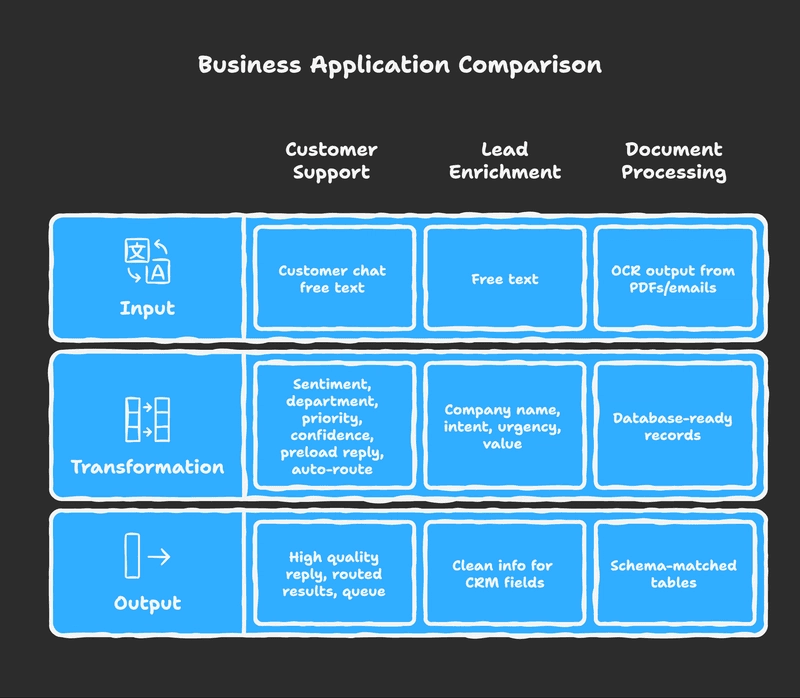
Real-World Business Applications
Customer support triage
Classify sentiment, department, priority, and confidence. Preload a safe reply. Auto route high confidence results. Queue the rest for human review.
Lead enrichment
Transform free text into company name, intent, urgency, and potential value. Feed clean fields into your CRM.
Document processing
Take OCR output from PDFs or emails and transform it into database-ready records using a schema that matches your tables.
Production Best Practices
- Constrain branching fields with enums. Do not accept free text for routing. Design within the published schema subset for better adherence.
- Add short, specific .describe() texts. Providers use these descriptions as guidance for generation.
- Keep schemas relatively flat. Deep nesting detects adherence. Start simple and add nesting only when it clearly helps.
- Validate at runtime with Zod. Even when the API enforces your schema,
.parse()yields safe objects or actionable errors. - Include a confidence score. Gate automation by threshold.
- Version your schemas. Add
schemaVersionand migrate intentionally.
Security Considerations
Structured outputs don't eliminate prompt injection risks, they just make the attack surface different.
- Delimit user input tightly: Use triple quotes or XML tags.
- Repeat constraints: Place critical instructions after user content.
- Detect PII: Add PII detection fields to your schema and redact before logging.
A Minimal, Repeatable Micro-Benchmark
Invite your team to measure rather than guess.
- Task:Classify 100 real tickets into your schema.
- Metrics:Schema valid rate using Zod, average latency, tokens, and manual spot check accuracy.
- Goal:Prove that schema enforcement gives you a higher valid rate and fewer retries than prose parsing.
Complete Working Example
// npm install zod openai

import { z } from "zod";
import OpenAI from "openai";
import { zodResponseFormat } from "openai/helpers/zod";

// 1. Define schema with clear descriptions
const ProductReviewSchema = z.object({
  rating: z.number().min(1).max(5)
    .describe("Star rating from 1 to 5"),
  pros: z.array(z.string())
    .describe("Positive aspects mentioned by reviewer"),
  cons: z.array(z.string())
    .describe("Negative aspects mentioned by reviewer"),
  wouldRecommend: z.boolean()
    .describe("Whether reviewer would recommend this product"),
  summary: z.string().max(200)
    .describe("Brief summary suitable for UI display")
});

type ProductReview = z.infer<typeof ProductReviewSchema>;

// 2. Create typed API function
const openai = new OpenAI({ apiKey: process.env.OPENAI_API_KEY });

async function analyzeReview(reviewText: string): Promise<ProductReview> {
  const completion = await openai.beta.chat.completions.parse({
    model: "gpt-4o-2024-11-20",
    temperature: 0,
    messages: [
      {
        role: "system",
        content: "Extract structured insights from product reviews. Be concise and accurate."
      },
      { role: "user", content: reviewText }
    ],
    response_format: zodResponseFormat(ProductReviewSchema, "product_review")
  });

  const result = completion.choices[0]?.message?.parsed;
  if (!result) {
    throw new Error("Failed to parse response");
  }

  return ProductReviewSchema.parse(result);
}
Moving Forward
Structured JSON output turns LLM integration from fragile text parsing into reliable, typed data processing. It reduces incidents, improves maintainability, and makes AI features feel native to your application.
Start with your most brittle endpoint. Replace prose parsing with schema enforcement. Let the numbers guide your rollout.
The core problem with LLM integrations is fragility. A single word change in the output breaks your regex parser.
Why "Structured Outputs" Matter
Modern APIs (OpenAI, Anthropic) don't just "try" to output JSON. They constrain the sampling loop. If the schema expects an integer, the model literally cannot generate a letter. It's an API-level guarantee.
The 4 Benefits
1. Zero Parsing Logic
Stop writing fragile regex. The model emits exact keys and types.
2. End-to-End Type Safety
Define schema with Zod, derive TypeScript types, and validate at runtime.
3. Operational Reliability
Reduced retry rates and format drift. Predictable error handling.
4. Maintainable Codebase
Consistent keys make dashboards and QA reliable.
The Pattern: Zod + TypeScript
// 1. Define Schema
const TicketSchema = z.object({
  department: z.enum(["sales", "support"]),
  priority: z.enum(["high", "low"])
});

// 2. Call LLM
const completion = await openai.chat.completions.create({
  // ...
  response_format: {
    type: "json_schema",
    json_schema: { schema: zodToJsonSchema(TicketSchema) }
  }
});

// 3. Validate
const ticket = TicketSchema.parse(JSON.parse(completion.content));
Danny's Quick Rules for Schemas:
- →Regex is not a Parser. Stop parsing LLM output with regex. It works for 100 examples and breaks on the 101st.
- →Use Native Structured Outputs. OpenAI, Anthropic, and Gemini all support JSON mode or Tool Use. This isn't a suggestion; it's the standard.
- →Type Safety is Mandatory. If you can't satisfy TypeScript at compile tiime, you shouldn't be shipping it. Use Zod to define your runtime contract.
- →Validation > Correction. Don't try to "fix" bad JSON. Reject it. Force the model to retry or fail gracefully.
The Bottom Line:
Unstructured text is for humans. Machines need schemas.